numpy 기초
Numpy 는 행렬 연산을 위한 핵심 라이브러리로 대규모 다차원 배열과 행렬 연산에 필요한 다양한 함수를 제공한다. 특히 메모리 버퍼에 배열 데이터를 저장하고 처리하는 효율적인 인터페이스를 제공한다.
Numpy 는 다음과 같은 특징을 갖는다.
- 강력한 N차원 배열 객체
- 정교한 Broadcast 기능
- C/C++ 및 포트란 코드 통합 도구
- 유용한 선형 대수학, 푸리에 변환 및 난수 기능
- 범용적 데이터 처리에 사용 가능한 다차원 컨테이너
Numpy 배열
파이썬에서 numpy 를 사용할때, 다음과 같이 numpy 모듈을 ‘np’로 사용한다.
import numpy as np
np.__version__
'1.20.3'
numpy 객체의 정보를 출력하기 위해 pprint( ) 를 정의한다.
def pprint(arr):
    print('type : {}'.format(type(arr)))
    print('shape : {}, demention : {}, dtype : {}'.format(arr.shape, arr.ndim, arr.dtype))
    print("array's Data : \n", arr)
배열 생성
numpy 배열 생성 방법이다.
1차원 배열 생성
arr = [1, 2, 3]
a = np.array([1, 2, 3])
pprint(a)
type : <class 'numpy.ndarray'>
shape : (3,), demention : 1, dtype : int64
array's Data :
 [1 2 3]
2차원 배열 생성, 원소 datatype 지정
arr = [(1, 2, 3), (4, 5, 6)]
a = np.array(arr, dtype = float)
pprint(a)
type : <class 'numpy.ndarray'>
shape : (2, 3), demention : 2, dtype : float64
array's Data :
 [[1. 2. 3.]
 [4. 5. 6.]]
3차원 배열 생성, 원소 datatype 지정
arr = np.array([[[1, 2, 3], [4, 5, 6]], [[3, 2, 1], [4, 5, 6]]], dtype = float)
a = np.array(arr, dtype = float)
pprint(a)
type : <class 'numpy.ndarray'>
shape : (2, 2, 3), demention : 3, dtype : float64
array's Data :
 [[[1. 2. 3.]
  [4. 5. 6.]]

 [[3. 2. 1.]
  [4. 5. 6.]]]
array1 = np.array([1, 2, 3])
array2 = np.array([[1, 2, 3], [2, 3, 4]])
array3 = np.array([[1, 2, 3]])
pprint(array1)
print()
pprint(array2)
print()
pprint(array3)
type : <class 'numpy.ndarray'>
shape : (3,), demention : 1, dtype : int64
array's Data :
 [1 2 3]

type : <class 'numpy.ndarray'>
shape : (2, 3), demention : 2, dtype : int64
array's Data :
 [[1 2 3]
 [2 3 4]]

type : <class 'numpy.ndarray'>
shape : (1, 3), demention : 2, dtype : int64
array's Data :
 [[1 2 3]]
배열 생성 및 초기화
np.zeors( )
- 지정된 shape의 배열을 생성하고, 모든 요소를 0으로 초기화
- zeors(shape, dtype=float, order=’C’)
a = np.zeros((3, 4))
pprint(a)
type : <class 'numpy.ndarray'>
shape : (3, 4), demention : 2, dtype : float64
array's Data :
 [[0. 0. 0. 0.]
 [0. 0. 0. 0.]
 [0. 0. 0. 0.]]
np.zeros( )
- 지정된 shape의 배열을 생성하고, 모든 요소를 1로 초기화
- np.ones(shape, dtype-None, order=’C’
a = np.ones((2,3,4),dtype=np.int16)
pprint(a)
type : <class 'numpy.ndarray'>
shape : (2, 3, 4), demention : 3, dtype : int16
array's Data :
 [[[1 1 1 1]
  [1 1 1 1]
  [1 1 1 1]]

 [[1 1 1 1]
  [1 1 1 1]
  [1 1 1 1]]]
np.full( )
- 지정된 shape의 배열을 생성하고, 모든 요소를 지정한 ‘fill_value’로 초기화
- np.full(shape, sill_value, dtype=None, order=’C’
a = np.full((2,2),7)
pprint(a)
type : <class 'numpy.ndarray'>
shape : (2, 2), demention : 2, dtype : int64
array's Data :
 [[7 7]
 [7 7]]
np.eye( )
- (N,N)shape의 단위행렬(Unit matrix)을 생성
- np.eye(N,M=None, k=0, dtype=<class ‘float’>)
np.eye(4)
array([[1., 0., 0., 0.],
       [0., 1., 0., 0.],
       [0., 0., 1., 0.],
       [0., 0., 0., 1.]])
np.empty( )
- 지정된 shape의 배열 생성
- empty(shape, dtype=float, order=’C’)
- 요소의 초기화 과정에 없고, 기존 메모리값을 그대로 사용
- 배열 생성비용이 가장 저렴하고 빠름
- 배열 사용 시 주의(초기화 고려)
a = np.empty((4, 2))
pprint(a)
type : <class 'numpy.ndarray'>
shape : (4, 2), demention : 2, dtype : float64
array's Data :
 [[0.00000000e+000 2.00390545e+000]
 [2.47032823e-323 0.00000000e+000]
 [0.00000000e+000 0.00000000e+000]
 [0.00000000e+000 0.00000000e+000]]
like( )
- 지정된 배열과 shape이 같은 행렬은 만든다.
- np.zeros_like : 요소가 0으로 채워진 행렬
- np.ones_like : 요소가 1로 채워진 행렬
- np.full_like : 요소가 입력한 요소로 채워진 행렬
- np.empty_like : 요소가 없는 행렬
a = np.array([[1, 2, 3], [4, 5, 6]])
b = np.ones_like(a)
c = np.full_like(a, 5)
pprint(b)
pprint(c)
type : <class 'numpy.ndarray'>
shape : (2, 3), demention : 2, dtype : int64
array's Data :
 [[1 1 1]
 [1 1 1]]
type : <class 'numpy.ndarray'>
shape : (2, 3), demention : 2, dtype : int64
array's Data :
 [[5 5 5]
 [5 5 5]]
데이터 생성 함수
주어진 조건으로 데이터를 생성한 수, 배열을 만드는 데이터 생성함수
- numpy.arange
- numpy.linspace
- numpy.logspace
np.arange( )
- numpy.arange(start, stop, step, dtype=None)
- start 부터 stop 미만까지 step 간격으로 데이터를 생성한후 배열을 만듦
- 범위내에서 step을 기준 균등하게 배열
- 요소의 갯수가 아닌 step을 기준으로 배열 생성
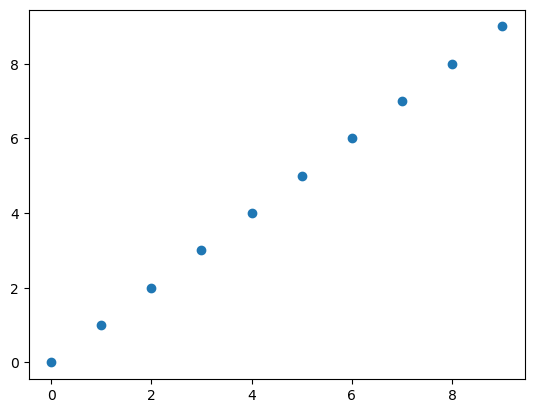
seq = np.arange(10)
pprint(seq)
type : <class 'numpy.ndarray'>
shape : (10,), demention : 1, dtype : int64
array's Data :
 [0 1 2 3 4 5 6 7 8 9]
import matplotlib.pyplot as plt    # 데이터 시각화 위해 import
plt.plot(seq, 'o')
plt.show()
np.linspace( )
- numpy.linspace(start, stop, num=50, endpoint=True, retstep=False, dtype=None)
- start부터 stop의 범위에서 num개를 균일간격으로 데이터를 생성하고 배열을 만드는 함수
- 요소 개수를 기준으로 균등한 간격으로 배열 생성
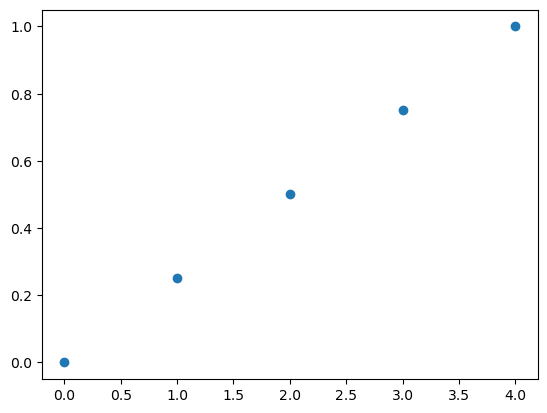
a = np.linspace(0, 1, 5)
pprint(a)
type : <class 'numpy.ndarray'>
shape : (5,), demention : 1, dtype : float64
array's Data :
 [0.   0.25 0.5  0.75 1.  ]
plt.plot(a, 'o')
plt.show()
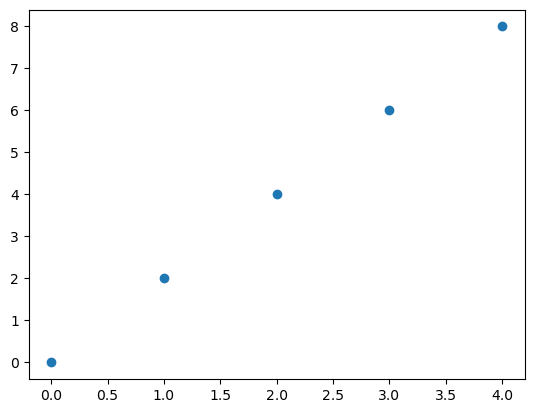
a = np.arange(0, 10, 2, np.float)
pprint(a)
type : <class 'numpy.ndarray'>
shape : (5,), demention : 1, dtype : float64
array's Data :
 [0. 2. 4. 6. 8.]


<ipython-input-47-5324c5374c50>:1: DeprecationWarning: `np.float` is a deprecated alias for the builtin `float`. To silence this warning, use `float` by itself. Doing this will not modify any behavior and is safe. If you specifically wanted the numpy scalar type, use `np.float64` here.
Deprecated in NumPy 1.20; for more details and guidance: https://numpy.org/devdocs/release/1.20.0-notes.html#deprecations
  a = np.arange(0, 10, 2, np.float)
plt.plot(a, 'o')
plt.show()
np.logspace( )
- numpy.logspace(start, stop, num=50, endpoint=True, base=10.0, dtype=None)
- 로그 스케일의 linspace 함수
- 로그스케일로 지정된 범위에서 num개수만틈 균등간격으로 데이터를 생성.
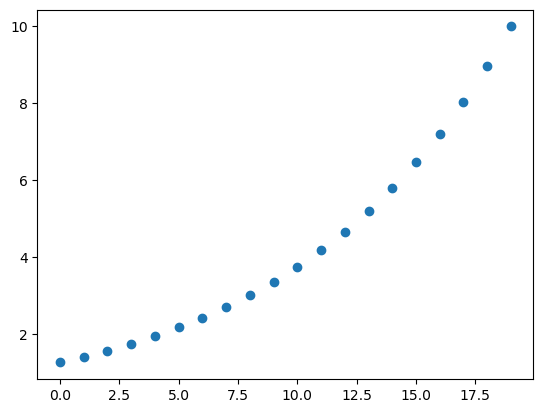
a = np.logspace(0.1, 1, 20, endpoint=True)
pprint(a)
type : <class 'numpy.ndarray'>
shape : (20,), demention : 1, dtype : float64
array's Data :
 [ 1.25892541  1.40400425  1.565802    1.74624535  1.94748304  2.1719114
  2.42220294  2.70133812  3.0126409   3.35981829  3.74700446  4.17881006
  4.66037703  5.19743987  5.79639395  6.46437163  7.2093272   8.04013161
  8.9666781  10.        ]
plt.plot(a, 'o')
plt.show()
array1 = np.arange(10)
array2 = array1.reshape(2, 5)
array3 = array1.reshape(5, 2)
array4 = array1.reshape(2, -1)
pprint(array1)
print()
pprint(array2)
print()
pprint(array3)
print()
pprint(array4)
type : <class 'numpy.ndarray'>
shape : (10,), demention : 1, dtype : int64
array's Data :
 [0 1 2 3 4 5 6 7 8 9]

type : <class 'numpy.ndarray'>
shape : (2, 5), demention : 2, dtype : int64
array's Data :
 [[0 1 2 3 4]
 [5 6 7 8 9]]

type : <class 'numpy.ndarray'>
shape : (5, 2), demention : 2, dtype : int64
array's Data :
 [[0 1]
 [2 3]
 [4 5]
 [6 7]
 [8 9]]

type : <class 'numpy.ndarray'>
shape : (2, 5), demention : 2, dtype : int64
array's Data :
 [[0 1 2 3 4]
 [5 6 7 8 9]]